# Godaddy-CPanel: Generate a CSR
## Generate a CSR (Certificate Signing Request) for my cPanel hosting
You can generate a Certificate Signing Request (CSR) in the cPanel account after your domain is pointing to the hosting product.
1. Go to your GoDaddy [product page](https://account.godaddy.com/products/).
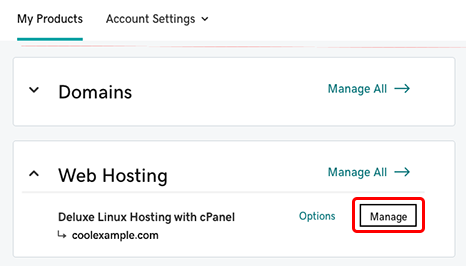
2. Under **Web Hosting**, next to the Linux Hosting account you want to use, click **Manage**.
3. In the account **Dashboard**, click **cPanel Admin**.
4. In the cPanel Home page, in the **Security** section, click **SSL/TLS**.
5. Under **Certificate Signing Requests (CSR)**, click **Generate, view, or delete SSL certificate signing requests**.
6. Complete the fields in the **Generate a New Certificate Signing Request (CSR)** section.
| Field | Description |
| ----------- | ---------------------------------------------------------------------------------------------------------------------------------------------------------------------------------------------------------------------------------------------------- |
| **Key** | Detailed description. |
| **Domains** |
The fully-qualified domain name, or URL, you want to secure. Note: If you are requesting a Wildcard certificate, add an asterisk (\*) to the left of the common name where you want the wildcard, for example \*.coolexample.com.
|
| **City** | Name of the city where your organization is registered/located. Do not abbreviate. |
| **State** | Name of the state where your organization is located. Do not abbreviate. |
| **Country** | The two-letter International Organization for Standardization (ISO) format [country code](http://www.iso.org/iso/home/standards/country_codes/iso-3166-1_decoding_table.htm) for where your organization is legally registered. |
| **Company** | The legally-registered name for your business. If you are enrolling as an individual, enter the certificate requestor's name. |
1. At the bottom of the form, click the **Generate** button.
On the new page, your CSR will display in the **Encoded Certificate Signing Request** section. You'll need to make a copy of the CSR to request an SSL certificate.
### Next step
After you create a CSR, you will need to [request a Standard, Deluxe or Extended Validation certificate](https://www.godaddy.com/en-in/help/set-up-and-install-my-ssl-certificate-562).
***
## REFERENCES
*